
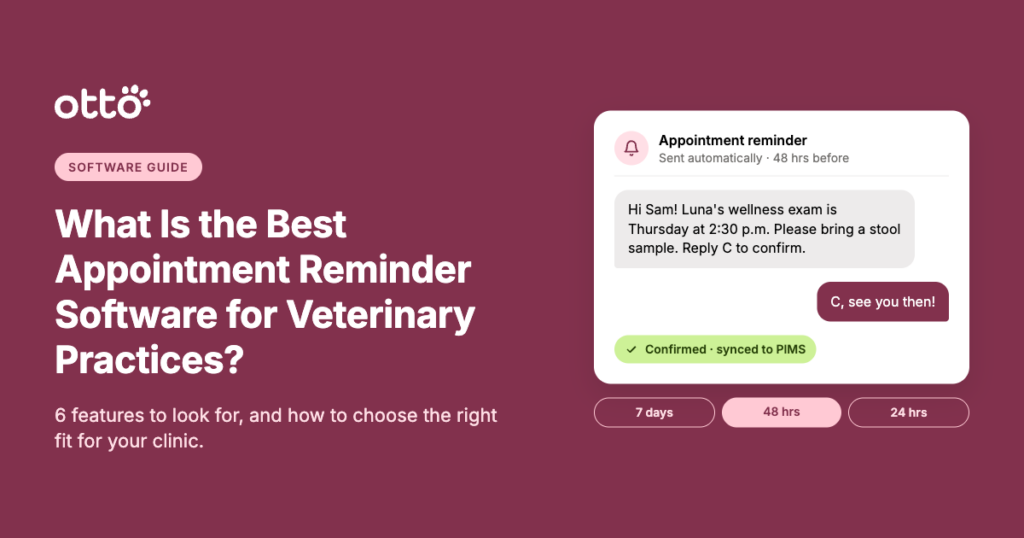
What Is the Best Appointment Reminder Software for Veterinary Practices?
A full appointment schedule is great for business. But when clients forget appointments, fail to confirm, or cancel at the last minute, those empty time slots can quickly become a headache for veterinary teams.
Missed appointments don’t just impact revenue. They disrupt daily workflows, create scheduling gaps, and leave front desk staff scrambling to fill openings that could have gone to another patient.
That’s why veterinary appointment reminder software has become an important tool for modern veterinary practices.
But with so many options available, how do you know which platform is right for your clinic?
Some solutions focus on automated text and email reminders. Others offer appointment confirmations, two-way communication, online booking, and practice management system (PIMS) integrations.
The best choice depends on your clinic’s size, existing technology, communication preferences, and operational goals.
Let’s explore what makes veterinary appointment reminder software effective, which features matter most, and how to choose the right solution for your practice.
What Is the Best Veterinary Appointment Reminder Software?
The best veterinary appointment reminder software helps practices automate appointment notifications, simplify confirmations, reduce no-shows, and keep clients informed without adding unnecessary administrative work.
Several veterinary technology providers offer appointment reminder capabilities, including PetDesk, Weave, AllyDVM, and Otto. Each approaches client communication and practice management workflows differently.
While some practices may only need a straightforward reminder tool, others benefit from a more comprehensive platform that connects reminders with scheduling, texting, digital forms, and other everyday tasks.
Ultimately, the best software isn’t necessarily the one with the most features. It’s the one that solves your practice’s biggest communication challenges while fitting naturally into your team’s workflow.
Why Appointment Reminder Software Matters for Veterinary Practices
Every appointment represents an opportunity to provide care, build client relationships, and support your practice’s financial health.
When clients miss appointments, the consequences extend beyond an empty exam room.
Your team may have already prepared for the visit, blocked off valuable appointment time, or turned away another client who needed care.
Without automated reminders, front desk teams also spend valuable time calling clients, leaving voicemails, tracking confirmations, and updating appointment statuses manually.
And today’s pet owners increasingly expect convenient, digital communication.
According to Weave’s 2023 Veterinary Business Insights Report, 81% of surveyed respondents preferred text messaging for appointment reminders.
For veterinary practices, automated reminders can help:
- Reduce missed appointments: Give clients timely reminders and opportunities to confirm or reschedule.
- Save staff time: Minimize manual confirmation calls and repetitive administrative tasks.
- Improve client communication: Keep pet owners informed about upcoming visits and important instructions.
- Support a more predictable schedule: Identify potential cancellations earlier and give teams more time to fill openings.
- Create a better client experience: Make appointment management more convenient for busy pet owners.
However, the effectiveness of appointment reminder software depends on how well it supports your clinic’s day-to-day operations.
6 Features to Look for in Veterinary Appointment Reminder Software
Not every veterinary clinic needs the same technology, but there are several features worth prioritizing when comparing appointment reminder solutions.
1. Automated Text and Email Reminders
The foundation of any good appointment reminder system is automation.
Instead of relying on staff to manually contact every client, the software should automatically send reminders based on scheduled appointments.
Look for a platform that supports:
- Automated SMS and email reminders
- Personalized messages with pet and appointment details
- Customizable reminder schedules
- Different messaging workflows for different appointment types
- Clear instructions for confirming or rescheduling
For example, a dental procedure may require fasting instructions, while a routine wellness appointment might include a reminder to bring a stool sample.
Personalized communication helps ensure clients receive information that’s relevant to their upcoming visit.
2. Two-Way Communication and Appointment Confirmations
Sending a reminder is helpful. Making it easy for clients to respond is even better.
Two-way texting allows pet owners to confirm appointments, ask questions, or request scheduling changes without calling the clinic.
For busy veterinary front desks, this can significantly reduce the amount of time spent playing phone tag.
Some platforms also offer automated or AI-assisted appointment confirmations that recognize client responses and help route requests to the appropriate workflow.
When evaluating this feature, consider whether the software can distinguish between a straightforward confirmation and a message that requires staff attention.
3. Reliable PIMS Integration
Your appointment reminder software should work with your existing practice management system, not create another disconnected workflow.
Without reliable integration, staff may have to manually update appointment confirmations, client information, or scheduling changes across multiple platforms.
Look for software that can:
- Sync appointment information with your PIMS
- Keep client contact information updated
- Reflect appointment confirmations when supported
- Reduce duplicate data entry
- Minimize discrepancies between systems
It’s also worth asking how frequently information syncs.
Some platforms update information more frequently than others, and certain integrations may offer more functionality depending on the PIMS your practice uses.
Before choosing a provider, confirm exactly which integration capabilities are supported for your specific PIMS.
4. Customizable Reminder Timing
Not every appointment requires the same reminder schedule.
A routine wellness visit booked months in advance may benefit from several reminders, while an appointment scheduled for the following day may only need one.
A typical veterinary appointment reminder cadence might look like this:
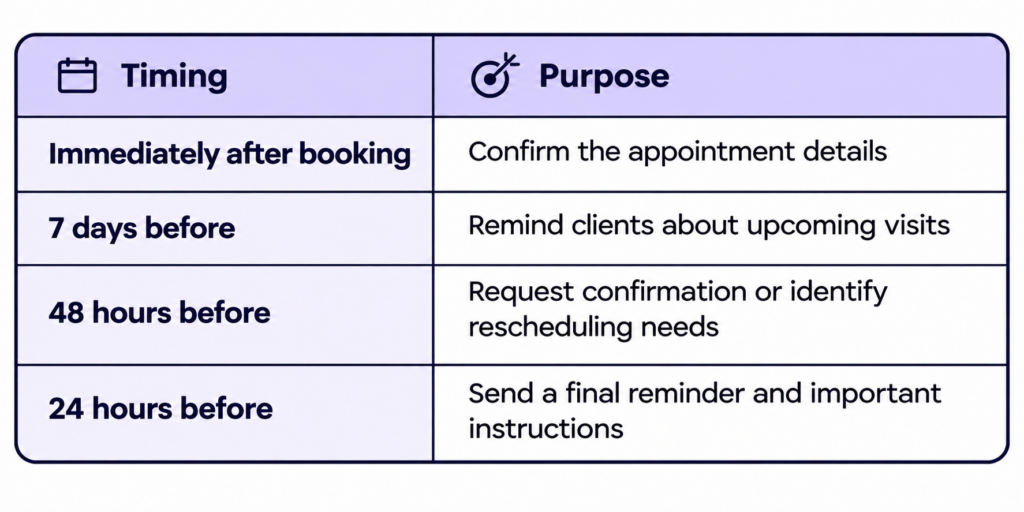
The ideal schedule will depend on your clinic’s appointment volume, client preferences, and historical no-show patterns.
The goal is to provide helpful reminders without overwhelming clients with unnecessary messages.
For more guidance, explore Otto’s Ultimate Guide to Appointment Reminders.
5. Digital Forms and Pre-Appointment Communication
Appointment reminders are just one part of preparing for a successful veterinary visit.
Many practices also need to collect medical histories, update client information, share procedure instructions, and obtain consent before an appointment.
Some veterinary communication platforms connect appointment reminders with digital forms and other pre-visit workflows.
This can help clinics:
- Collect important information before check-in
- Reduce paperwork and administrative delays
- Communicate procedure instructions in advance
- Improve appointment preparation
- Create a smoother experience for clients and staff
For practices looking to streamline the entire appointment process, these additional capabilities may be worth considering.
6. Transparent Pricing and Scalability
Cost is another important factor when evaluating veterinary appointment reminder software.
Some platforms offer reminders as a standalone service, while others include them within a broader client communication subscription.
Depending on the provider, additional fees may apply for texting, integrations, extra users, or advanced features.
Before committing, ask:
- Are automated reminders included in the base subscription?
- Are there limits on text messages or emails?
- Does two-way texting cost extra?
- Are PIMS integrations included?
- Will the platform scale as our practice grows?
The most affordable option upfront isn’t always the most cost-effective over time.
Consider the total value of the platform, including how much staff time it could save and whether it can replace other tools your practice already pays for.
Comparing Veterinary Appointment Reminder Software Options
Several veterinary software providers offer appointment reminder and client communication capabilities.
Here are a few options practices may encounter when researching solutions.
Otto
Otto is an all-in-one veterinary client communication platform that combines automated appointment reminders with two-way texting, online booking, digital forms, and other workflow tools.
Otto also offers AI-powered appointment confirmations that can interpret natural client responses and help automate routine follow-up tasks.
For practices interested in consolidating multiple communication tools, Otto may be worth considering because reminders are connected to a broader client communication platform.
Its predictable pricing structure and unlimited texting can also appeal to clinics looking to avoid usage-based messaging fees.
PetDesk
PetDesk offers veterinary client engagement tools, including appointment reminders, client communication, and other features designed to support patient engagement.
It may appeal to practices looking for a platform focused on client-facing communication and engagement.
When evaluating PetDesk, consider its current package options, supported integrations, and which communication features are included.
Weave
Weave provides communication tools for veterinary practices, including phone systems, texting, appointment reminders, and other client engagement features.
It may be worth exploring for clinics that want to manage phone communications and digital messaging through a single provider.
Practices should review the specific capabilities, pricing, and integrations available for their existing systems.
AllyDVM
AllyDVM offers veterinary client communication and engagement tools, including appointment reminders and automated outreach.
It may be an option for clinics prioritizing reminders, client retention, and ongoing communication.
As with any platform, practices should evaluate integration compatibility, customization options, and how the software fits their current workflows.
The bottom line: Each platform offers a different combination of features. The best fit depends on whether your clinic needs basic appointment reminders, a more comprehensive communication system, or an integrated platform that supports multiple workflows.
How to Choose the Right Appointment Reminder Software for Your Clinic
Before scheduling demos or comparing pricing, take a closer look at your practice’s current reminder process.
Where is your team spending the most time? Which tasks still require manual work? And what would make appointment management easier for both staff and clients?
Here are five questions to guide your decision.
1. How much time does our team spend confirming appointments?
If your front desk spends hours calling clients, automated reminders and two-way confirmations could be a priority.
2. Does the software integrate with our existing PIMS?
Confirm compatibility and ask how appointment information and client responses move between systems.
3. Can clients easily confirm or reschedule?
The easier it is for clients to communicate changes, the more opportunities your practice has to manage scheduling gaps proactively.
4. Do we need reminders or a more comprehensive communication platform?
A standalone reminder tool may be sufficient for some clinics. Others may benefit from combining reminders, texting, online booking, and digital forms.
5. What is the total cost of ownership?
Consider subscription fees, messaging limits, integrations, and additional features before making a decision.
Most importantly, involve your front desk team in the evaluation process. They’re the ones managing appointment communication every day and can provide valuable insight into which features will make the biggest difference.
How Can Veterinary Practices Get More Value From Appointment Reminders?
Even the best appointment reminder software won’t deliver its full value without a thoughtful communication strategy.
Once you’ve selected a platform, focus on making your reminder workflows as effective as possible.
Personalize your messages. Include the pet’s name, appointment details, and relevant instructions whenever possible.
Give clients an easy way to respond. Make it simple to confirm appointments or request changes without calling the clinic.
Use different reminders for different appointment types. Surgical procedures, wellness visits, and follow-up appointments may require different communication.
Monitor appointment trends. Track no-show rates, confirmation rates, and cancellations to identify opportunities for improvement.
Make reminders part of a connected workflow. Consider how reminders work alongside online booking, digital forms, and other client communication tools.
Small adjustments to your reminder strategy can help create a more consistent experience for clients while reducing repetitive work for your team.
The Best Veterinary Appointment Reminder Software Should Make Life Easier
There’s no single appointment reminder platform that’s the perfect fit for every veterinary practice.
Some clinics need a simple way to automate texts and emails. Others want to reduce phone calls, streamline confirmations, connect with their PIMS, and simplify the entire appointment experience.
What matters most is choosing software that supports your team’s workflows and makes it easier for clients to stay engaged with their pets’ care.
Solutions like PetDesk, Weave, AllyDVM, and Otto offer different approaches to veterinary client communication, making it important to compare features, integrations, and pricing before deciding.
For practices looking to bring appointment reminders, two-way communication, digital forms, and online booking together, an all-in-one platform like Otto can help reduce the number of disconnected systems your team manages.