
How to Set Up Online Booking Rules for Vet Clinics
Online booking can be a game-changer for veterinary practices. It gives pet parents the flexibility to schedule appointments whenever it’s convenient, reduces incoming phone calls, and helps keep appointment calendars full.
And the phone alone isn’t keeping up. In a 2025 secret-shopper study published in the JAVMA, researchers called more than 5,000 randomly selected practices in six states posing as owners of a new dog. They secured an appointment only 67% of the time, and when they didn’t, it was usually because they couldn’t reach staff or were left on hold for more than five minutes. Clinics are responding: according to data cited by Veterinary Practice News, practices’ use of online booking grew 87% in 2025.
But there’s a catch: Not every veterinary appointment should be scheduled the same way.
A routine wellness exam requires a different amount of time, preparation, and staff availability than a sick visit, surgical consultation, or technician appointment. Without the right scheduling rules, online booking can quickly create more work for your team instead of less.
Most clinics haven’t made that distinction yet. Across more than 500 Otto clinics that offer both routine and sick appointment types online, 87.6% have them configured identically: same duration, same booking notice, same provider selection.
The solution? Set up online booking rules based on appointment type.
With the right approach, veterinary clinics can give clients more control over scheduling while ensuring appointments are booked at appropriate times, with the right team members, and for the right amount of time.
Here’s how to get started.
What are online booking rules for veterinary clinics?
Online booking rules are settings that determine which appointments clients can schedule online and under what conditions.
These rules help veterinary practices manage their schedules by controlling factors such as:
- Appointment type: Which services can be booked online?
- Appointment duration: How much time should each visit receive?
- Provider availability: Which veterinarians or team members can perform each service?
- Booking windows: How far in advance can clients schedule?
- Scheduling restrictions: Are certain appointment types limited to specific days or times?
- Client eligibility: Can new clients book online, or is booking limited to existing clients?
For example, a clinic might allow pet parents to schedule wellness exams up to 60 days in advance but require sick visits to be booked within a shorter window.
These rules help prevent scheduling conflicts, protect staff availability, and make online booking a more reliable option for both clients and veterinary teams.
How do you set up online booking rules by appointment type?
The best way to set up online booking rules is to categorize your clinic’s appointments, establish scheduling requirements for each category, and configure your booking software to reflect those needs.
Here’s a six-step process veterinary practices can follow.
1. Identify which appointment types should be available online
Start by reviewing the services your clinic offers and determining which appointments are appropriate for self-scheduling. Not every visit needs to be available through online booking.
Routine, predictable appointments are typically the easiest place to start because they have consistent durations and scheduling requirements. They’re also what pet parents book most. When Otto analyzed more than 53,000 visit reasons pet parents entered on online booking requests, nearly two-thirds were for wellness, vaccines, or both. About one in eight was for a sick or injured pet.
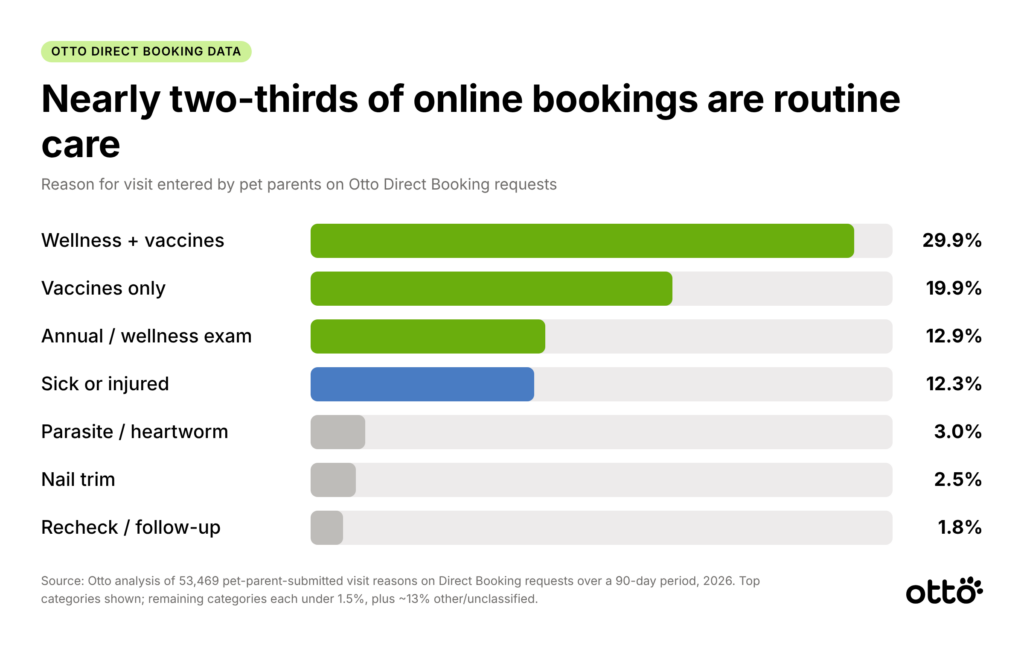
That doesn’t mean sick visits should be off the table. In Otto’s data, clinics that offered a sick-visit type online saw higher booking completion (37%) than clinics that didn’t (32%). That’s a correlation, not proof, but it suggests pet parents are more likely to finish booking when they can find an option that matches why they’re coming in. The number of appointment types a clinic offered showed no clear relationship with completion either way. Coverage of what clients actually need matters more than length of the menu.
Examples of veterinary appointment types and potential booking rules
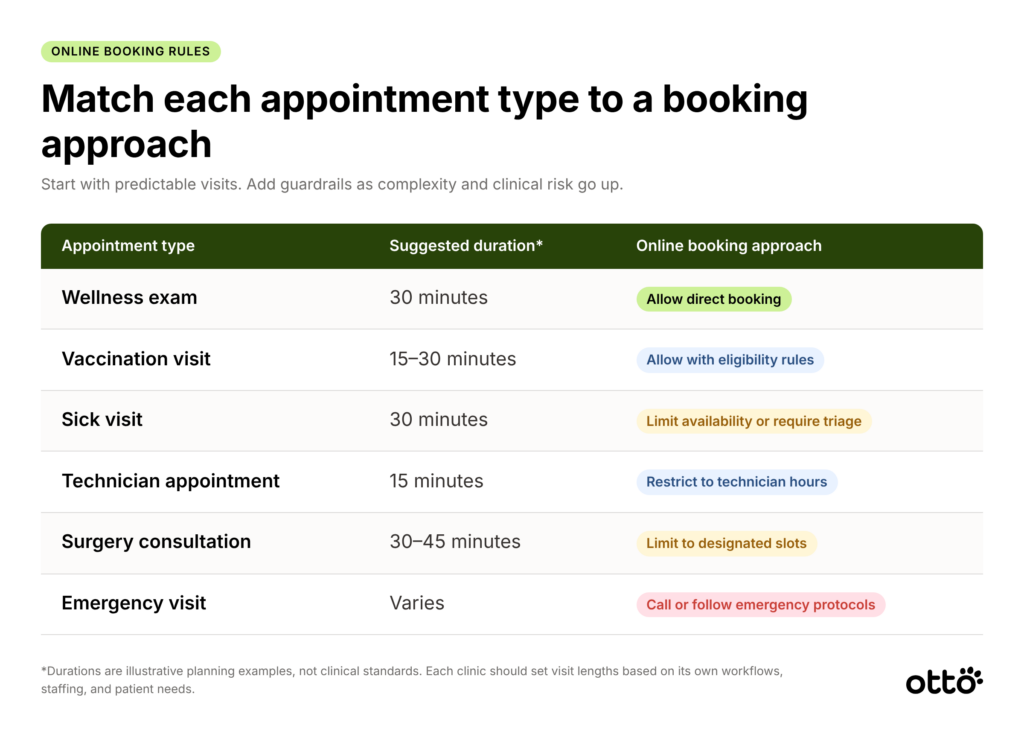
Durations are illustrative planning examples, not clinical standards. Each clinic should determine appropriate visit lengths based on its own workflows, staffing, and patient needs.
Pro tip: Start with two or three straightforward appointment types, such as wellness exams and routine preventive care visits, before expanding your online booking options. This allows your team to test the workflow, identify scheduling challenges, and make adjustments without disrupting the entire calendar.
Pro tip: Name appointment types the way clients talk. In Otto’s booking data, pet parents described routine visits as “annual” more than five times as often as “wellness,” and almost no one typed “sick visit.” They described symptoms instead, like “ear infection” or “itchy.” Labels like “Annual exam” and “Sick or injured pet” are easier to recognize than internal names.
2. Set appointment durations based on visit complexity
One of the most important online booking rules is appointment duration.
If every appointment is assigned the same amount of time, your clinic risks running behind schedule, overloading veterinarians, or creating unnecessary gaps in the day.
Instead, assign appointment lengths based on the typical time required for each service. For example, a routine vaccine appointment may require less time than a new-patient examination or a visit involving multiple health concerns.
When determining appointment duration, consider the time needed for patient intake, examination, diagnostics, client education, and documentation.
Some practices may also benefit from adding buffer time between certain appointment types, especially when additional preparation or room turnover is required. Some booking tools, including Otto, let you show clients one appointment length while reserving a longer block on the schedule, so buffer time is built in without confusing pet parents.
The goal isn’t simply to fit more appointments into the day. It’s to build a schedule your team can realistically manage.
3. Create provider-specific scheduling rules
Not every team member performs every service, and your online booking system should reflect that.
Provider-specific rules help ensure appointments are scheduled with the appropriate veterinarian, technician, or other qualified team member. For example:
- Technician appointments may only be available during designated technician hours.
- Certain procedures may be restricted to veterinarians with the appropriate training or equipment.
- New-patient examinations may require a veterinarian rather than a technician.
- Specific services may only be offered on certain days of the week.
By aligning online availability with your team’s actual capabilities, you can reduce the need to manually reschedule appointments after clients book.
This is particularly helpful for multi-doctor practices with varying schedules and service offerings. If your doctors share appointment types, consider hiding provider selection from clients altogether so bookings spread evenly across the team rather than stacking up on one popular doctor.
4. Establish booking windows and availability restrictions
Giving clients access to your entire calendar isn’t always the best approach.
Booking windows allow clinics to control how far in advance appointments can be scheduled and how much notice is required. For example, your clinic might establish rules such as:
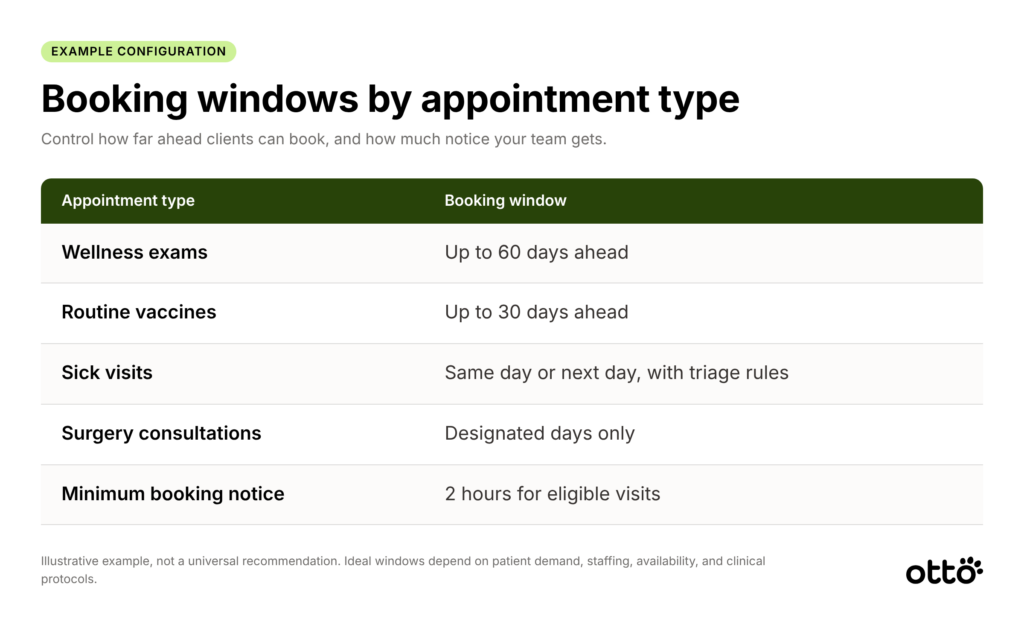
These are examples rather than universal recommendations. Your clinic’s ideal booking windows will depend on patient demand, staffing, appointment availability, and clinical protocols.
You may also want to reserve certain appointment slots for urgent patient needs rather than making every opening available for routine online scheduling.
Just don’t over-restrict. When pet parents look at your availability and can’t find a time that works, most don’t come back to book online. In Otto’s data, nearly half of those who left without booking ended up calling the clinic within two weeks, which is exactly the phone volume online booking is meant to reduce.
For sick visits, triage rules don’t have to hurt the experience. Otto clinics can flag keywords (like “bleeding” or “not breathing”) that either warn the client or block online booking and direct them to call. Sessions that triggered a warning still completed booking at a rate at or above average, so clients appreciate the guidance rather than abandoning.
Pro tip: Review your appointment demand by day of the week. If Mondays consistently have more sick visits, consider protecting additional same-day capacity instead of filling every opening with routine appointments.
5. Define rules for new versus existing clients
New clients and existing clients often have different scheduling needs.
An established patient may already have medical records, vaccination history, and client information in your practice management system (PIMS). A new client may require additional information before their first appointment.
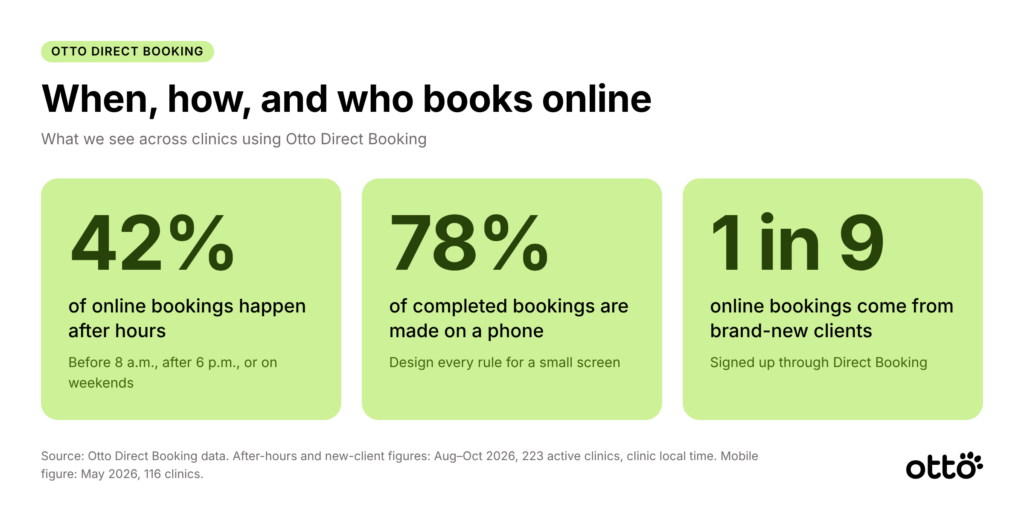
Online booking is also a meaningful new-client channel. About one in nine online bookings through Otto comes from a brand-new client who signs up during booking, and Vetsource data puts new clients at 23% of online bookings industry-wide. New clients also have more steps to complete, so keep their path as short as your intake needs allow.
When configuring online booking, consider whether your clinic should:
- Allow new clients to book specific appointment types.
- Require additional intake information for first-time visits.
- Assign longer appointment durations to new-patient exams.
- Restrict certain services to established patients.
- Request relevant medical records before the appointment.
Establishing these rules helps your team prepare appropriately and reduces unnecessary back-and-forth with clients.
It also makes the booking experience clearer for pet parents, who can see which appointments are available to them without needing to call for basic scheduling questions.
6. Test your booking experience before going live
Before launching online booking, test the process from the client’s perspective.
Try scheduling different appointment types to confirm that your rules work as intended. And test on a phone: 78% of completed online bookings through Otto are made on a mobile device.
Pay particular attention to whether clients can select the correct services, appointment durations are accurate, provider availability is reflected properly, and restricted appointments remain unavailable.
If your booking platform integrates with your PIMS, verify that appointments appear correctly in your clinic’s schedule and that client and patient information is handled as expected.
It’s also worth asking a few team members to complete test bookings. Front-desk staff often spot workflow issues that may not be obvious during the initial setup. Look for a preview or test mode so your team can walk the full flow without creating real appointments.
Common online booking mistakes veterinary clinics should avoid
Even with online scheduling software in place, a few common mistakes can create unnecessary challenges.
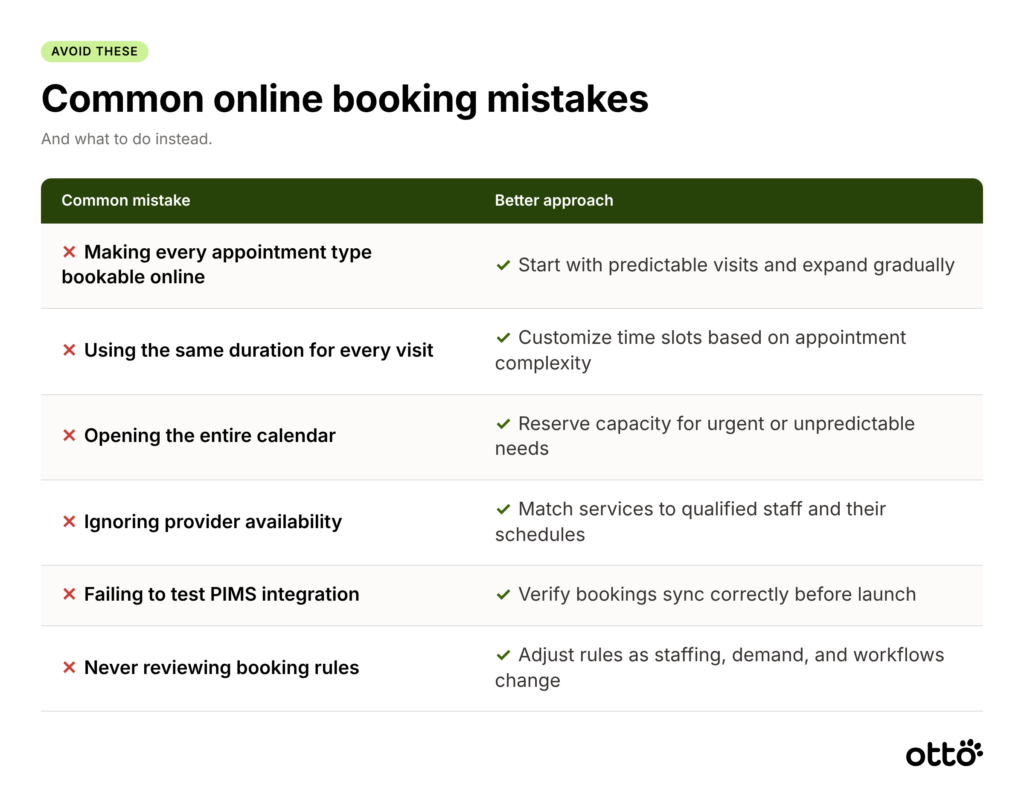
The most effective online booking setup isn’t necessarily the one with the most available appointments. It’s the one that makes scheduling easier without creating additional work for your team.
How can veterinary clinics improve online booking efficiency?
Once your booking rules are established, the next step is optimizing how online scheduling fits into your clinic’s daily operations.
Consider tracking these metrics:
- Online booking adoption: How many appointments are scheduled online versus by phone?
- After-hours bookings: How many clients schedule when your clinic is closed? Across Otto clinics, it’s 42%.
- Rescheduling rate: How frequently do online bookings require manual changes?
- Appointment utilization: Are online booking rules helping fill available slots?
- No-show rate: Are certain appointment types more likely to result in missed visits? Pair online booking with automated confirmations and reminders; AAHA Trends notes this combination can cut no-shows by up to 50%.
These insights can help your team identify which appointment types work well for self-scheduling and which may need additional restrictions.
For example, if sick visits frequently require rescheduling after online booking, your clinic may need to adjust the appointment descriptions, available time slots, or triage requirements.
Reviewing booking performance regularly helps ensure your scheduling rules continue to support your practice as patient demand changes.
Make online booking easier with Otto
Setting up appointment-specific booking rules is an important step toward a more efficient veterinary schedule. But the right technology can make the entire experience even easier.
With Otto’s Direct Booking, pet parents can schedule available appointments through a clinic’s website widget, Pet Portal, or Otto App without waiting for a team member to call them back.
Less phone tag. More convenient scheduling.
Otto helps eligible clinics offer self-service appointment booking while keeping scheduling connected to their existing workflows.
With Otto Direct Booking:
- Pet parents can select from available appointment types and times.
- Clinics can offer online scheduling to existing clients and, when enabled, new clients.
- Clinics control the rules covered above: which appointment types are bookable, buffer time, booking notice, provider selection, and keyword-based triage for sick visits.
- Emergency-flagged appointment types route pet parents to a request queue instead of a calendar, so urgent cases reach your team rather than an open slot.
- Booked appointments appear immediately in Otto Flow and typically sync to supported PIMS platforms in approximately 1–3 minutes.
- Booking details appear in the clinic’s conversation queue, helping the team stay informed.
- Clients can schedule appointments outside normal business hours.
In fact, 42% of appointments booked through Otto Direct Booking happen after hours, helping clinics capture scheduling opportunities even when the front desk is closed.
Otto Direct Booking is available for eligible clinics using supported systems, including Cornerstone, Avimark, Impromed, and ezyVet, as well as certain clinics without a PIMS. Available booking configuration options may vary by integration and setup.
Give pet parents convenience without sacrificing control
Your clinic shouldn’t have to choose between making scheduling easier for clients and maintaining a manageable appointment calendar.
With thoughtful online booking rules and connected scheduling technology, you can create a smoother experience for everyone.